
What Does It Mean To Recall An Email

Ever have that moment? You hit send. You feel that little surge of accomplishment, maybe even a smug "Nailed it!" Then, BAM. Your brain does a frantic, full-body audit of what you just unleashed upon the digital ether. You remember the typo. Or worse, you remember that very embarrassing anecdote you accidentally included. Or, oh dear Neptune, you sent it to the wrong person. It’s like watching your car drive off a cliff in slow motion, except the car is your career and the cliff is your boss’s inbox.
This, my friends, is where the magical, the mythical, the often-dubious art of the email recall comes into play. It’s the digital equivalent of yelling "WAIT, WRONG BUTTON!" after you've already launched the rocket. But what does it really mean to recall an email? Is it a superpower? A secret handshake? Or just a polite suggestion to the email gods?
The "Oops, I Didn't Mean To Do That" Button
At its core, recalling an email is an attempt to snatch back a message you’ve already sent. Think of it as a digital boomerang. You throw it out there, realize it was a terrible idea, and desperately try to tug it back before it hits its target. Most email clients, like Outlook (the king of the corporate kingdom for many of us) or Gmail (the rebel with a cause, sometimes), offer this glorious little option.
It’s usually tucked away in a menu, looking all innocent, like a fluffy kitten that can suddenly breathe fire. You click it, and the system, in its infinite digital wisdom, tries to perform a miracle. It sends a tiny little digital ninja to the recipient's inbox to intercept your outgoing message and replace it with… well, nothing. Or, sometimes, a message saying you tried to recall the previous one. Which, let's be honest, is often just as awkward.
How Does This Sorcery Work? (Spoiler: It's Not Actual Sorcery)
The secret sauce behind email recall isn't quite as glamorous as a Harry Potter spell. It relies on a few key conditions, and frankly, the universe aligning in your favor. First and foremost, for the recall to even have a chance of working, both you and the recipient need to be using the same email server. This is crucial. Think of it like trying to recall a letter you sent to your grandma in Alaska if she now lives in Timbuktu. The postal service in Timbuktu isn't going to care about your Alaskan mailman’s frantic efforts.
So, if you’re sending an email from your work account to another work account on the same server, there’s a glimmer of hope. If you’re sending it to a Hotmail address from your Gmail, well, good luck with that. That email is on a one-way ticket to the digital Wild West.
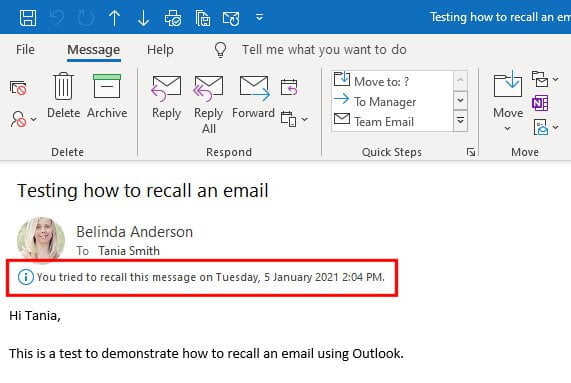
Secondly, and this is a biggie, the recipient can't have already opened the email. This is the most heartbreaking part. You hit recall. You see the little spinning wheel of destiny. And then you get that dreaded notification: "Message could not be recalled. The recipient has already opened the message." It’s like trying to put the genie back in the bottle after it’s already granted three wishes, and one of those wishes was to reveal your deepest, darkest secret.
If they haven't opened it, your digital ninja gets to work. They try to find your email in the recipient's inbox and delete it. It’s a race against time, and the recipient's internet speed. A fast internet connection for them is your sworn enemy in this scenario.
The Different Flavors of "Recall"
Email clients usually offer a couple of variations on the recall theme, each with its own brand of hope and despair:

1. "Recall This Message" (The Standard, Often Futile Attempt)
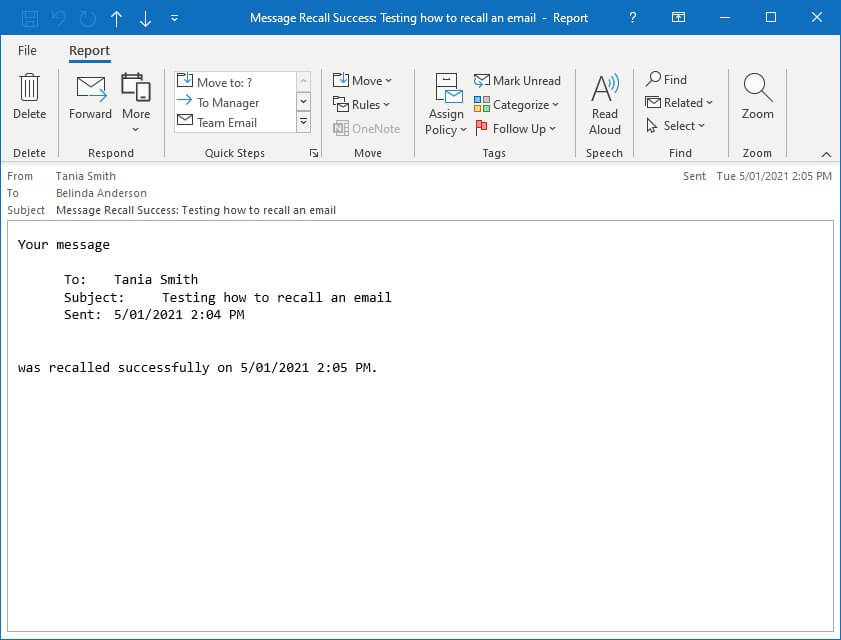
This is your go-to. You click it, and the system tries to delete the original message. If it works, the recipient sees a message like "You have deleted a message from [Your Name]." If it fails, you get the aforementioned soul-crushing notification.
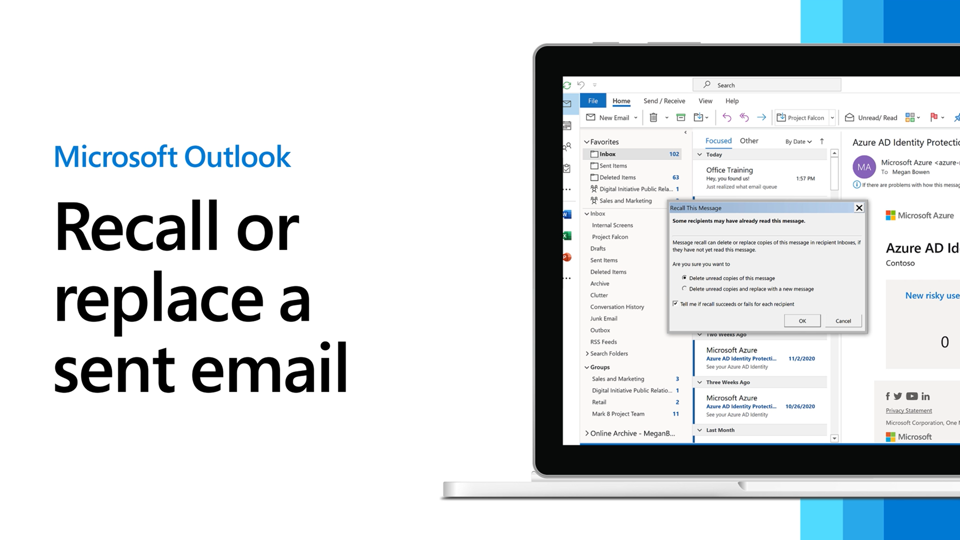
2. "Recall This Message and Replace With a New Message" (The Double-Edged Sword)
This is for when you realize you sent a masterpiece… that was supposed to be a haiku, not an epic poem. You want to yank the original and pop in a corrected version. The idea is that your corrected email will replace the original. It sounds great in theory. In practice? It can be a bit of a mess. Sometimes you end up with both emails. Sometimes the replacement email arrives before the original is deleted. It’s like a clumsy dance where everyone steps on everyone else’s toes.
And remember that handy little "notify me if recall succeeds or fails" checkbox? Use it. It’s your lifeline. It’s the little red flag that tells you whether to breathe a sigh of relief or start practicing your apology speech.
When Recalls Go Wrong (Which Is Often)
Let's talk about the glorious failures. They are, in my humble opinion, more entertaining than the successes. Imagine sending a draft email that was meant to be a private vent about Brenda from accounting's questionable stapler-hoarding habits. You accidentally send it to Brenda herself. You frantically hit recall. Brenda, being the eagle-eyed stapler enthusiast she is, has already opened it. Not only has she opened it, but she's also forwarded it to HR, the CEO, and possibly the Queen of England. Your recall attempt just put a neon sign on your mistake. Oops.
Another common pitfall is the sheer speed of the internet. Emails, especially in today's hyper-connected world, can travel faster than a rumor at a gossip convention. If the recipient is a speed demon with a lightning-fast connection, your recall ninja might as well be on a unicycle powered by a hamster.
And then there are the third-party email clients. If the recipient is using a fancy, corporate-approved email client that's not on the same server, your recall attempt might just bounce off it like a rubber chicken hitting a brick wall. They're designed to be independent, and frankly, they don't always play nice with others' recall attempts.
The Moral of the Story?
So, what does it mean to recall an email? It means you're playing digital roulette. It's a last-ditch effort, a Hail Mary pass, a desperate plea to the tech gods. It can work, under very specific, often improbable circumstances. But more often than not, it’s a reminder that once something hits the internet, it’s basically wearing a cape and flying off into the sunset. You can try to snag it, but it’s probably already on its way to Mars.
The best advice? Proofread like your job depends on it (because it sometimes does). Double-check recipients. Take a deep breath before hitting send. Because while the recall button is a comforting thought, it’s not a magic eraser. It's more like a very polite, and often ineffective, suggestion.
And if all else fails? Well, at least you’ve got a great story for the café. And maybe a new appreciation for the art of the carefully crafted, typo-free email. Cheers to that!