
How Do I Open A Mpp File
Ever stumbled across a file with that intriguing .mpp extension and thought, "What on earth is this, and how do I even begin to explore its digital depths?" Don't worry, you're not alone. These little digital mysteries pop up more often than you might think, especially if you've ever dabbled in project management, even casually.
Think of an .mpp file like a secret blueprint for a project. It’s the native format for Microsoft Project, a powerhouse of a tool used by everyone from your neighborhood contractor planning a deck renovation to global corporations orchestrating the next big product launch. So, if you've been handed one of these, it means someone's been busy mapping out tasks, timelines, and resources. It's basically their digital brain dump of how to get something done, from start to finish.
Now, the immediate question is: how do I open it? The most straightforward answer, and often the most effective, is with the software it was designed for. But hey, we're not all running the full Microsoft Project suite, are we? Life's too short for endless software subscriptions, and sometimes we just need a peek, not a deep dive into Gantt charts that could rival the Sistine Chapel.
The OG Way: Microsoft Project Itself
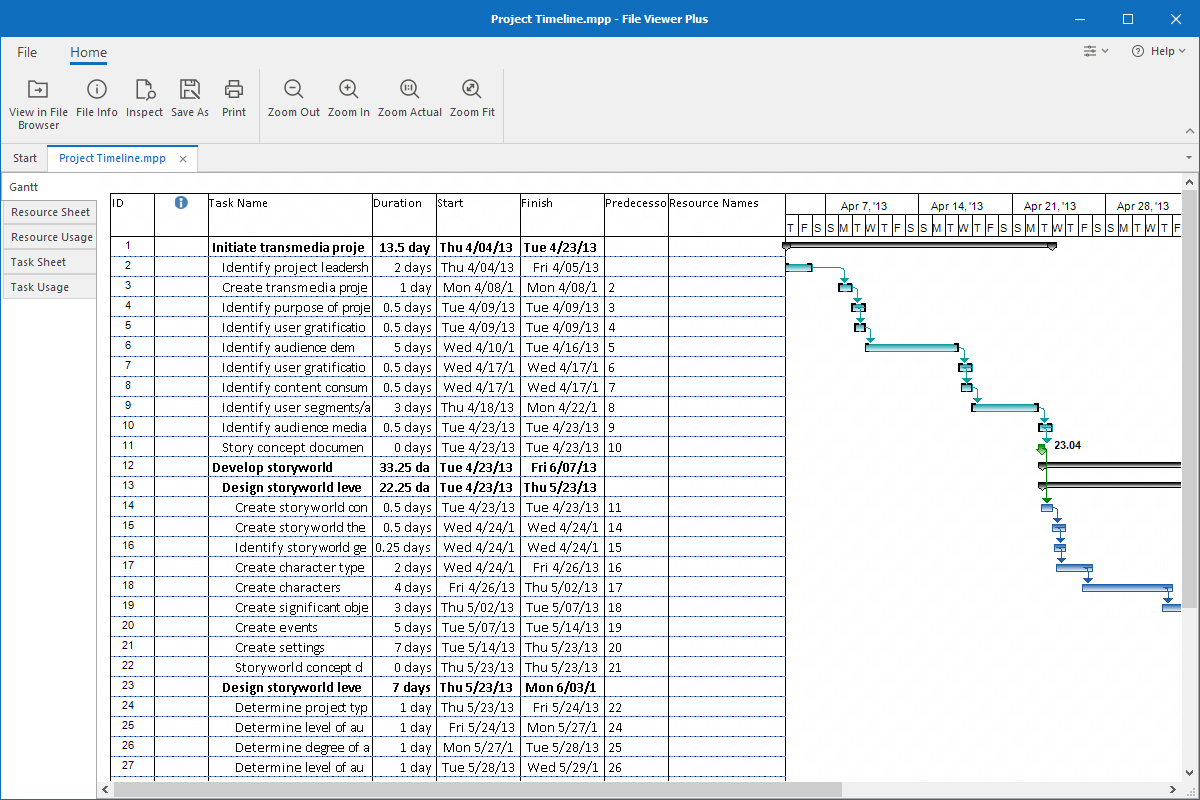
If you're lucky enough to have Microsoft Project installed on your computer, opening an .mpp file is as simple as opening any other document. Just navigate to the file, and double-click. It should launch directly into Project, presenting you with the project plan in all its glory. You'll see tasks, durations, dependencies, and maybe even assignee names. It’s like walking into the architect’s office and seeing the plans laid out on a huge table.
However, let’s be real. Microsoft Project is a professional-grade application, and it can be a bit of a splurge. If you only need to open an .mpp file occasionally, investing in the full software might feel like buying a Ferrari just to go to the corner shop. But if your job or a significant hobby involves project planning, then it’s the gold standard. You'll unlock the full power to edit, update, and manage the project effectively.
When the Full Suite Isn't an Option
So, what if you don't have Microsoft Project? Don't despair! The digital world is full of clever workarounds and alternative solutions, much like finding a great independent coffee shop when your usual chain is closed.
One of the most common and user-friendly options for viewing .mpp files without the full Project software is through Microsoft Project Viewer. There are several free and paid versions of these viewers available. They essentially let you see the contents of the .mpp file, much like you can view a PDF without having Adobe Acrobat Pro.

Some popular free viewers allow you to open and read the file, seeing the task lists, timelines, and resource assignments. You won't be able to make edits, but for a quick check or to understand the scope of a project, they are perfect. It’s like getting a sneak peek behind the curtain without having to join the circus.
Pro Tip: When searching for a free viewer, look for reputable sources. Sometimes, "free" can come with a hidden cost in the form of unwanted software or pop-ups. Stick to well-known software providers or review sites.
Online Solutions: The Cloud is Your Friend
In our increasingly connected world, cloud-based solutions are a game-changer. Several online platforms and project management tools offer the ability to upload and view .mpp files. These are fantastic because they require no software installation and are often accessible from any device with an internet connection.
Think of it like accessing your cloud storage for photos. You can upload your .mpp file to a compatible online service, and then view it directly in your web browser. Some of these services even offer basic editing capabilities, which is a step up from just viewing.

Platforms like ProjectLibre, for instance, offer a free, open-source alternative to Microsoft Project that can often import and work with .mpp files. While it might not be 100% compatible with every single feature of the latest Microsoft Project versions, it’s a very strong contender for opening and managing your files without breaking the bank. It’s the indie band of project management software – might not have the mainstream polish, but has a dedicated following and a lot of heart.
Other online project management tools might have import features. You upload your .mpp, and they convert it into their own format for you to work with. This is great if you’re already using a particular tool for team collaboration and want to integrate your existing project plans.
Fun Fact: The concept of a Gantt chart, a cornerstone of project management visualization found in .mpp files, was popularized by Henry Gantt in 1910, but early versions date back much further! It’s a testament to how long humans have been trying to visually map out their ambitions.
Converting the File: A Little Digital Alchemy
Sometimes, the best approach is to convert the .mpp file into a more universally accessible format. While direct conversion isn't always perfect, it can be a lifesaver if you need to share the project plan with someone who definitely doesn't have Microsoft Project and you can't rely on online viewers.
You can find online file converters that specialize in .mpp files. These tools attempt to transform your project plan into formats like Excel spreadsheets, PDF documents, or even other project management formats. The downside is that complex project structures, dependencies, and resource assignments might not translate perfectly. It's a bit like translating a poem – you get the meaning, but some of the nuance might get lost.
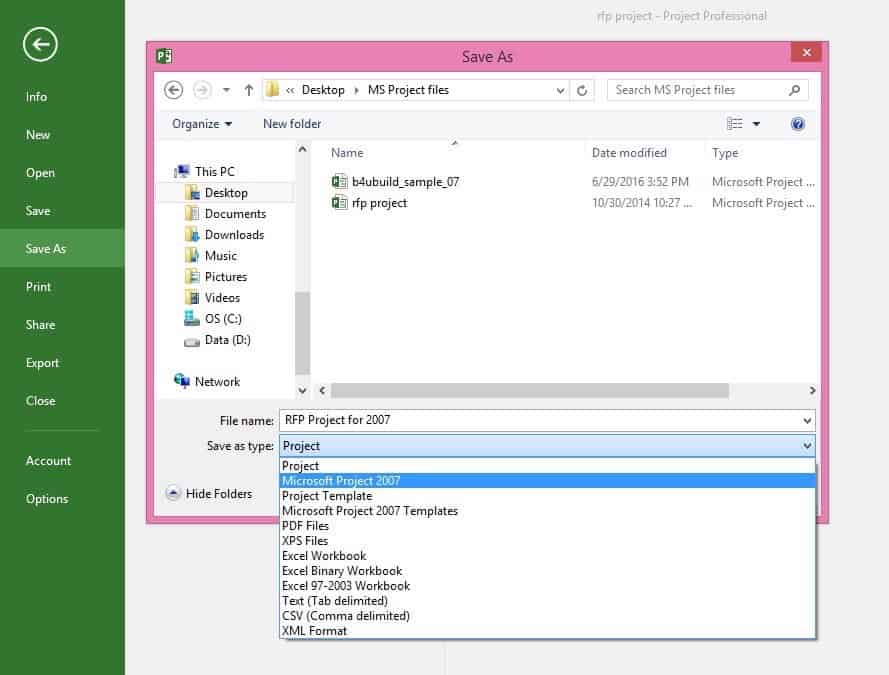
For example, converting to an Excel file will give you a table of tasks, durations, and perhaps start/end dates. It’s excellent for a high-level overview or for simple task lists. Converting to PDF is great for sharing a static snapshot of the project plan, perfect for reporting or for stakeholders who just need to see the timeline.
Cultural Reference: Think of this conversion process like adapting a book into a movie. The core story is there, but the medium changes how you experience it. Some things are gained, and some are slightly altered.
What if It's Not a Standard MPP?
It’s worth mentioning that while .mpp is strongly associated with Microsoft Project, sometimes other, less common applications might use it. However, for the vast majority of cases, it’s going to be a Microsoft Project file. If you’ve tried the common methods and still can't open it, it’s worth checking the source of the file. Was it definitely sent by someone using Microsoft Project? Could it be a slightly older or a very niche version?
If you’re unsure, a quick message back to the sender asking what software they used to create it is always a good move. They might even be able to send it in a different format, saving you the trouble. Communication is key, even in the digital realm!

Beyond the Viewer: Understanding the Contents
Once you've successfully opened your .mpp file, what are you actually looking at? It’s a project plan, a roadmap designed to guide a project from inception to completion. You'll typically see:
- Tasks: The individual steps or activities that need to be completed.
- Durations: How long each task is expected to take.
- Dependencies: Which tasks need to be finished before others can start. Think of it like building blocks – you can’t put the roof on before the walls are up.
- Milestones: Significant points in the project, usually with zero duration, marking the completion of a major phase.
- Resources: Who or what is assigned to each task (people, equipment, materials).
- Gantt Chart: The visual representation of the project timeline, where tasks are shown as bars along a calendar. It’s the iconic visual that most people associate with project management.
Understanding these elements will give you a clear picture of the project's scope, its expected timeline, and who is responsible for what. It’s a powerful way to grasp the complexity and effort involved.
A Final Thought on Our Digital Lives
So, how do you open an .mpp file? It’s a journey, really. From the straightforward path of having the right software, to exploring the digital landscape for viewers, online tools, or converters. Each method offers a different perspective, a different way to engage with the information contained within.
In a way, this is a metaphor for so much of our daily lives. We encounter things – ideas, challenges, new technologies – and we need to figure out how to interact with them. Sometimes we have the perfect tool right at hand. Other times, we have to get a little creative, explore our options, and perhaps even learn a new skill. The key is not to be intimidated by the unfamiliar file extension or the complex-looking software. There’s almost always a way to understand and engage. It’s about embracing curiosity and knowing that the digital world, much like the real one, is full of accessible wonders, waiting to be explored.
Next time you see an .mpp file, don't just shrug. See it as an invitation – an invitation to understand a plan, to grasp a vision, and perhaps, to even contribute to bringing it to life. Happy exploring!